Product Specific bootloader
This document describes the steps necessary to take the per-product bootloader in use on your Movesense product.
Implementing product specific bootloader on your sensor
The basic flow of protecting the bootloader goes like this:
-
Decide an ID for your key. This is just so that different bootloaders can be easily separated from your and our side.
-
Create a private key running the following command:
nrfutil keys generate privatekey-<KEYIDHERE>.pemNOTE: Store this key securely and keep it to yourself! If you lose it, the only way to update sensors with a new firmware is with a Jig! -
Create a public key by running the command:
nrfutil keys display --key pk --format code privatekey-<KEYIDHERE>.pem --out_file dfu_public_key-<KEYIDHERE>.cSend the public key file to us, and we’ll add it to our movesense-bootloader -repository and our CI will build you the bootloader hex-file that we send back to you. -
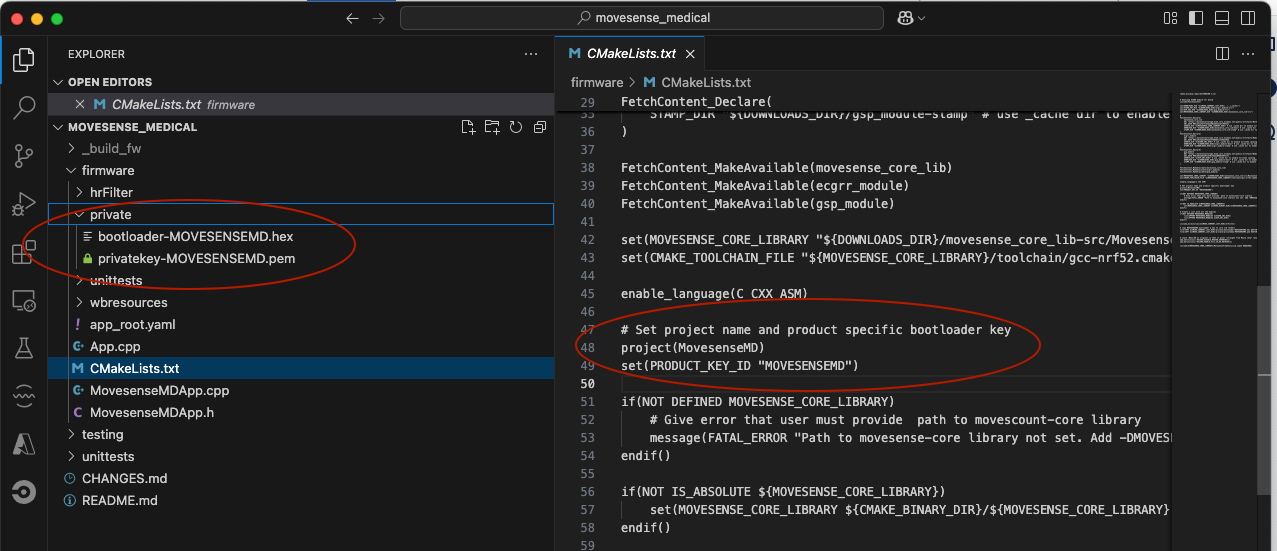
Add the line
set(PRODUCT_KEY_ID "<KEYIDHERE>")in the CMakeLists.txt file of your firmware project -
Add the files, privatekey-
.pem and bootloader-.hex , into your firmware build folder in subfolder "private", so that the build process can find them. Here’s a pic from our Movesense MD firmware that describes the structure.
Important details to remember
-
Currently there is no easy way to create a DFU that would change the sensor bootloader. It may be possible using nrfutil, but for now we’ve concentrated in the basic flow. After the sensor has the new bootloader, the only DFU packets that the DFU process approves are the ones built by you.
-
The easiest way to flash the sensor with your own booloader and firmware is to use the Movesense Programming Jig.
-
If you protect the sensor flash memory with APPPROTECT flag, the only way to flash it so that the sensor identity is kept (serial number and other product details), is by re-running it on our production line in Finland.